
Partnering with Tulane University
Six Red Marbles is proud to partner with Tulane University’s Celia Scott Weatherhead School of Public Health and Tropical Medicine.
This site contains resources to support faculty members seeking to learn more about engaging with the SRM team.
Our Partnership

Six Red Marbles currently partners with Tulane University's Celia Scott Weatherhead School of Public Health and Tropical Medicine to develop new courses, refresh existing courses, and prepare courses for upcoming terms.
Since Spring 2022, SRM has supported Tulane's SPHTM faculty with course term preparation and course development — working alongside faculty at every stage, from research through release.
How We Work TogetherReady for Every Semester
SRM handles the heavy lifting of updating course details before each semester starts. It's often a faculty member's first introduction to our team — and a chance to experience SRM's Learning Experience Design expertise firsthand. We build rapport, move quickly, and get your course live on time.
Built Around Your Vision
Whether refreshing existing content or building a new course from the ground up, our instructional designers partner with you at every step. We bring media, interactive learning objects, and subject matter expertise together — and in every instance, you retain complete control over the content of your course.
"I really appreciated the organizational skills [of my SRM instructional designer Samantha] and her willingness to dig into the details to make sure my syllabus matched up with the course modules. She was open to feedback and corrections. She was able to make edits quickly and we were able to post the course on time without delays. All of her communications were professional and courteous. I felt like we were team members working together on a project."
We invite you to learn more about our work together by exploring the resources and information below.
Interactive Learning Objects
Interactive learning objects (ILOs) can diversify methods for engaging with course content, reinforce student knowledge of course content by facilitating interactive opportunities to visually organize information, explain complex course content in a way that is tailored to a faculty’s teaching style, and stimulate cognitive and affective responses that can drive class conversations, provoke a reassessment of core values, and spark new ideas.
To understand how your colleagues are using ILOs to improve learner engagement, watch the videos below to see ILO exemplars created by Six Red Marbles to support SPHTM faculty.
Note: The ILOs shown in the videos above are the property of the respective SPHTM faculty noted. The ILOs have been integrated into courses owned by the faculty and licensed for use by Tulane University’s School of Public Health and Tropical Medicine.
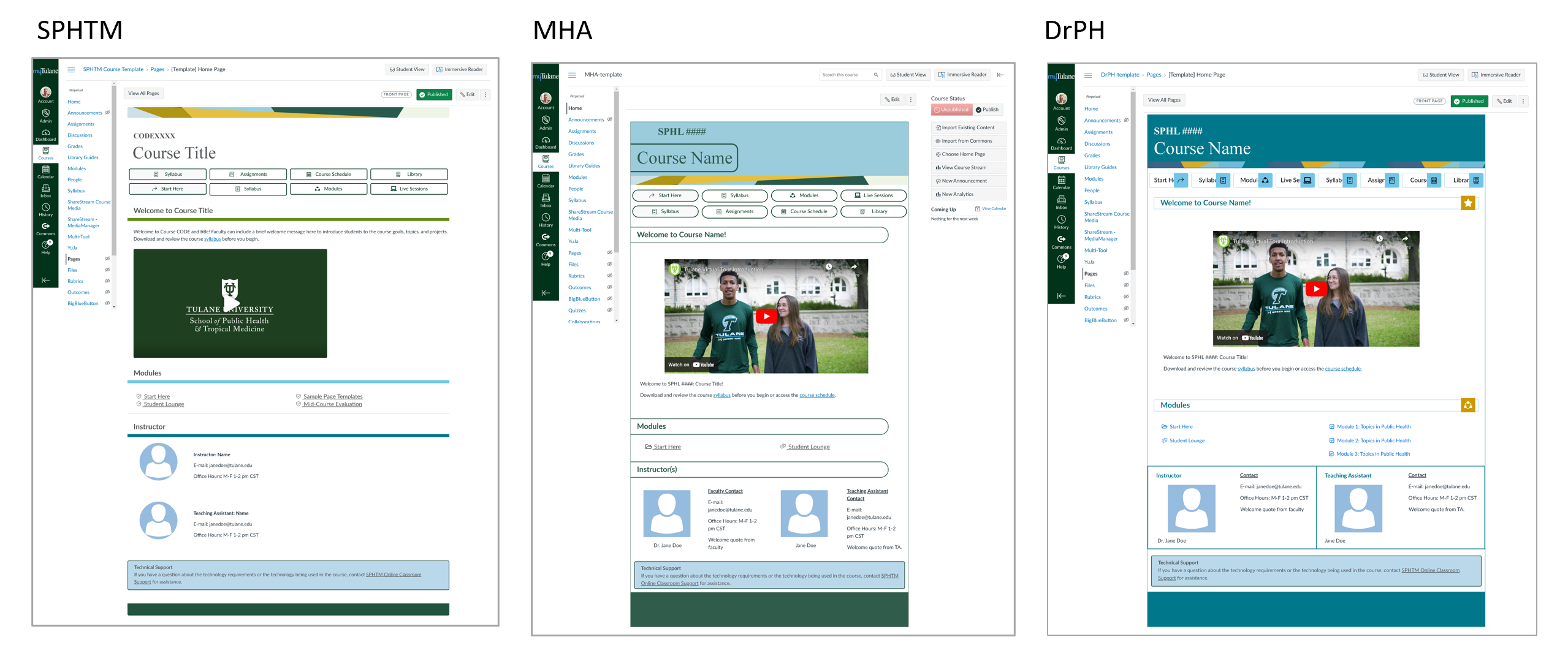
SPHTM Canvas Templates
Your Six Red Marbles Team


Kris Van Horn
AVP, Higher Education Partnerships


Mary Kaler
Customer Success Manager

Sulo Turner
Lead Project Manager


James Peters
Team Lead, Learning Experience Design


Kim Prokosch
Director, Learning Experience Design
Engage with SRM
Six Red Marbles works closely with your school's administration to coordinate and schedule ongoing work with faculty. To get started, reach out to your school's administrative representative.
Celia Scott Weatherhead School of Public Health & Tropical Medicine

FAQ
Course Term Prep: What content can I expect my SRM instructional designer to update as part of the process?
Your SRM instructional designer will hold an initial meeting with you to discuss your course and your expectations. During the meeting, you will provide any new content you’d like to add to the course, and you will review your completed course syllabus to ensure it is updated with contact information, due dates for assignments, and times for live session dates. Your SRM instructional designer will then spend the next few days implementing the changes discussed.
Your SRM instructional designer will take responsibility for the following in Canvas:
- Importing existing Canvas course content into the new Canvas shell for the current term
- Importing a new mid-semester evaluation (which will be left unpublished)
- Adding any new content discussed and provided by faculty
- Updating the course information per the syllabus
- Removing all outdated announcements (will confirm with faculty before removal)
- Updating dates on all assignments, discussions, knowledge checks, quizzes, midterms, and final
- Confirming that all assignment submission settings align with written expectations
- Updating the date ranges on titles for all weekly modules, based on the syllabus
- Updating links to assignments in the module starting and ending pages
- Reviewing the syllabus to confirm up-to-date attendance language is included
- Uploading a PDF of the approved syllabus to the Canvas Syllabus tab
- Reviewing any faculty-added links in the left-side navigation to ensure the links are updated for the current course and do not point to the previous semester
- Reviewing the course content for any major errors and implementing any necessary updates as approved by faculty
- Confirming all items (e.g., pages, assignments, discussions) have unique names on the modules page
- Ensuring all graded components appear in the gradebook
- Confirming the grading scale is aligned to the course grading scale
- Confirming the grading policy aligns with the grading policy as implemented in Canvas
- Confirming point values assigned to each assignment are the same as points provided in the associated rubric
- Adding Live Session pages to the correct modules with basic instructions on where to join sessions and find recordings
- Confirming that the calendar confirms that all Zoom sessions from the previous semester are no longer visible and that all new Zoom sessions for the current semester are listed
- Performing a final QA (quality assurance) check in Student View to ensure every page, assignment, and discussion appear as expected and that all links work as expected
Course Development: What can I expect during the typical 16-week course development timeline?
This sample 16-week development timeline is provided to help you understand what to expect when partnering with an SRM instructional designer on a course build. It highlights the typical topics SRM’s instructional designers will want to cover during each weekly meeting as well as what deliverables you may be responsible for providing. You can expect to commit anywhere between 5 and 10 hours per week to a course build project. While SRM attempts to standardize its processes across its instructional design team, SRM will work to tailor the course build experience to meet the needs of specific faculty members when possible.
Sample-16-Week-Development-Timeline
What is "media"?
Your SRM instructional designer may use the term media as an umbrella term to describe the types of supplemental items that can be used to enhance your course content. “Media” is a term that can refer to items such as lecture videos, PowerPoints, slide presentations, images, animations, simulations, virtual labs, and interactive learning objects like drag and drop, matching activities, and case studies.
Why should I leverage the new Canvas template?
Using a Canvas template has many benefits:
- It will save you time. Instead of building each item or module within your course, you can focus on the course content.
- It provides consistency and uniformity. Students, teaching assistants, and instructors can more easily navigate and use the course.
- It applies best learning practices. Information is organized more naturally, which helps learners avoid content overload.
- It incorporates accessible formatting that helps students, especially those with disabilities, navigate your Canvas site.
- It provides brand identity. It helps build a sense of community and continuity and positively influences student perception and experiences.
Remember: you are still in control of your course and its content. You can still edit the template. If there is an item that you don’t need, you can remove it. When you use the template, it is still your course but with a head start!
How do I contact SRM if I need additional support?
To receive support related to current work already underway with SRM, contact SRM’s project manager at TulaneSupport@sixredmarbles.com.
To learn how to get started with a new project, contact your department head or your school’s administrative representative, Dr. Christine Arcari.
